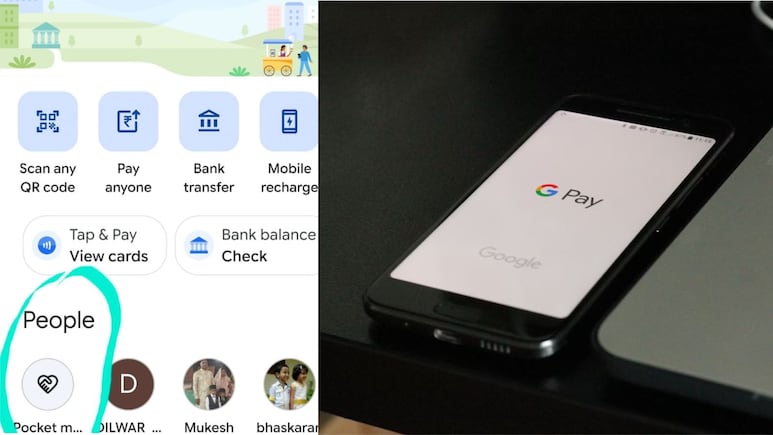
Google Pay has introduced a new "Pocket Money" feature under its UPI Circle system. The feature is designed to allow a primary user to add family members or others as secondary users, so that they can make payments even without having their own bank accounts. However, many users online have raised concerns about its safety. Some have also claimed that just by tapping the Pocket Money icon on the app dashboard could lead to automatic money deduction.
Sharing a similar concern, a user posted on X: “GooglePay…Can you pls confirm what this new icon named "Pocket Money "is sitting as a 1st icon in Google Pay? Many people are reporting money deductions when clicked on this icon…”
@Google @GooglePayIndia @GooglePay Can you pls confirm what is this new icon named "Pocket Money" sitting as a 1st icon on the People page in Google Pay? Many people r reporting money deduction when clicked on this icon. This might lead to cyber complaints on fraudulent activity pic.twitter.com/hTx1F6ewIN
Also Read | Layoffs Are Rising In Tech, But These Skills Are Helping People Unlock Better Pay
— Prassadd (@prasad1104) April 9, 2026
ALSO READ: What Is Pocket Money Feature In Google Pay: Who Can Use And How To Set Up Account
Another person tried to confirm this claim using Grok chatbot on X: “Grok, is this true that there is a handshake logo called pocket money or something near to our last or recent payment person' name in gpay, and if we touch or try to open, the hackers will access our money via scam?”
@grok is this true as there is a handshake logo called pocket money or something near to our last or recent payment person' name in gpay, and if we touch or try to open, the hackers will access our money via scam?
— அசோக் கொன்றையாண்டி (@ashokkon) April 7, 2026
Other users also shared similar concerns, with some warning their followers not to click on the icon to avoid being scammed.
Are These Claims True?
So far, there have not been any confirmed reports that people faced any fraud activity because of using GooglePay "Pocket Money" feature. The Pocket Money feature allows controlled access to a primary user's bank account. While designed to allow trusted contacts to debit money via your bank account, It includes multiple security steps such as approval controls and spending limits to ensure safety.
A primary user can add family members or other contacts as secondary users. These secondary users can pay without having their own bank account. The primary user manages usage by setting limits and authorising transactions.
There are two ways to use the feature in Google Pay's UPI Circle. With full delegation, primary users can set a monthly limit of up to Rs 15,000. It will allow secondary users to spend freely within this limit. With partial delegation, every transaction needs approval from the primary user. For this, the secondary user will need to send a request permission for each payment.
To establish a secondary user, Google Pay requires you to add their key information such as government ID and relationship with the primary user. The Pocket Money account can be set up by the primary user and while sending invites to secondary users, they need to share their UPI PIN for added safety.
How To Set UP Pocket Money Feature
- Open Google Pay app and visit UPI Circle
- Search and select the Secondary user's name or phone number.
- Scan the selected contact's UPI Circle QR code and set up approval settings.
- You can either select, "Approve every payment” or “Set a monthly limit:"
- Set a preferred monthly limit in case of option 1.
- Add additional details for a Secondary user such as relationship, government ID number.
- Choose your bank account for them and then click on invite.
- To send an invite, you will need to enter your UPI PIN.
ALSO READ: WhatsApp Rolling Out Usernames Feature For iOS, Android: Here's How It Works
Essential Business Intelligence, Sharp Market Insights, Practical Personal Finance Advice, Daily Fuel, Gold and Silver Prices and Latest Stories — On NDTV Profit.