
Cupertino-based tech giant Apple rolled out iOS 27 for compatible iPhone models on Sept. 14. The latest software update, which was first previewed at September and shine event last week, has advanced Siri AI capabilities as well as a variety of other refinements, improvements, and new features to iPhones.
Also Read | Layoffs Are Rising In Tech, But These Skills Are Helping People Unlock Better Pay
It comes as an over-the-air (OTA) software update on compatible iPhones. The recently launched iPhone 18 Pro models and iPhone Duo would be the first models to ship with the new OS.
But the new software version is not compatible for every device, here's how to download iOS 27, which iPhone models are eligible and its new features.
Also Read: Apple's Next Move? macOS Code Hints At Beats-Branded iPhone Gaming Controllers
How to Download and Install iOS 27?
When iOS 27 become available, you can download and install the update by following this step-by-step guide:
Step 1: Go to the settings app on your iPhone.
Step 2: Then tap ‘General'.
Step 3: Select software update.
Step 4: Wait for your device to contact Apple's servers and check for available updates.
Step 5: Tap download and install when iOS 27 appears.
Step 6: Follow the on-screen instructions until the iPhone restarts.
It is advisable to back up important data and ensure that the iPhone has sufficient battery or is connected to a charger before beginning the installation.
iOS 27 Eligible iPhones
The update is eligible with iPhone 11 and newer models, along with the second- and third-generation iPhone SE.
- iPhone 18 Series
- iPhone Duo
- iPhone 17 Series
- iPhone 16 Series
- iPhone 15 Series
- iPhone 14 Series
- iPhone 13 Series
- iPhone 12 Series
- iPhone 11 Series
- iPhone SE (3rd generation, 2022)
- iPhone SE (2nd generation, 2020)
iOS 27 Biggest Features
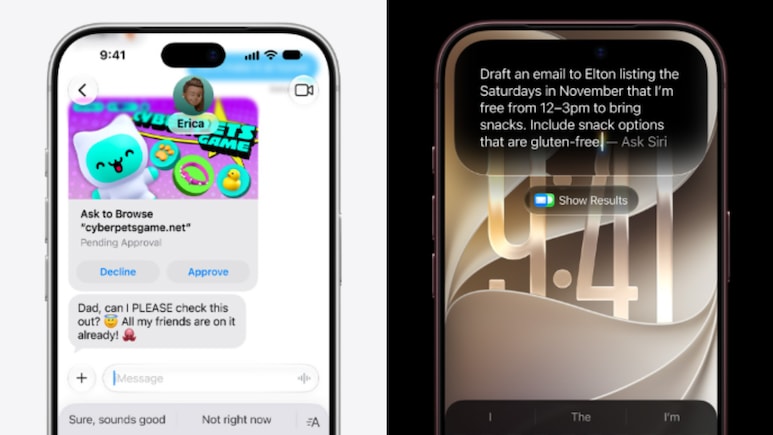
The most significant change in iOS 27 is the revamped Siri AI experience. The tech giant has released a dedicated Siri app that enables users to initiate conversations and revisit previous interactions. The new Siri is said to combine Apple's Foundation Models with Google's Gemini models. It gains personal context functionality, which allows it to retrieve information from apps and carry out operations across eligible apps.
Apple is also boosting Visual Intelligence with its most recent software upgrade. Users can use the function in the iPhone's Camera app to examine objects and scenes, ask Siri questions about what they see, and take appropriate actions. This feature can also assess on-screen content.
The Liquid Glass interface, which was unveiled with iOS 26, is another feature receiving more personalisation possibilities. It allows users to alter the transparency of the UI elements. The Photos, Safari, Wallet, and Shortcuts apps also include additional Apple Intelligence features.
Also Read: iPhone 17 Pro, Pro Max Get Big Discounts: Prices Drop After iPhone 18 Sale
Lastly, a variety of developments have been included for parental controls. This includes requests to buy and browse, time allowances, contact approvals, and schedules.
Other updates include a contextual suggestion in Messages and Mail, revamped Phone app, and Safari's ability to organise tabs by topic.
Essential Business Intelligence, Sharp Market Insights, Practical Personal Finance Advice, Daily Fuel, Gold and Silver Prices and Latest Stories — On NDTV Profit.