ChatGPT users now have a way to tuck away conversations they'd rather others didn't see. OpenAI has launched Locked Chats, a feature that places selected chats behind a PIN or biometric lock. It started reaching users on Tuesday and is coming to every plan, from Free, Go, Plus and Pro to Business, Enterprise and Edu.
How It Works
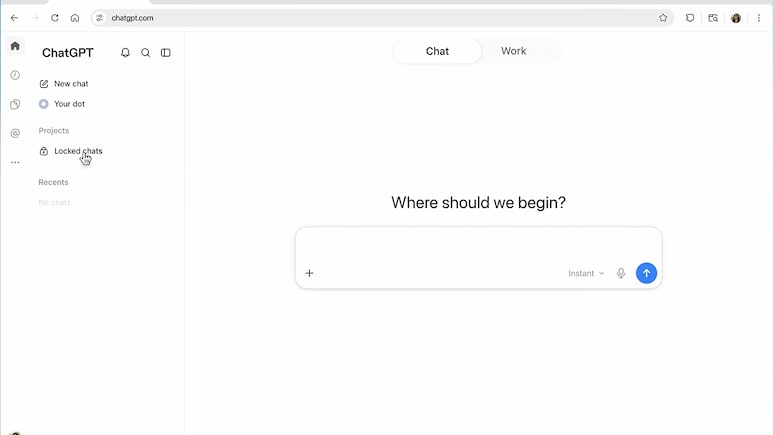
Once a conversation is locked, it disappears from the usual chat list, search results and pinned chats. It is moved into a separate, protected area, which sits under Projects in a section called Locked chats.
Getting into this section requires a four-digit PIN, which ChatGPT asks users to create the first time they lock a chat or open the section. On the web and desktop apps, the PIN is the only way in. On supported phones, users can also choose Face ID, Touch ID or their device's unlock method instead of typing the PIN.
Also Read | Layoffs Are Rising In Tech, But These Skills Are Helping People Unlock Better Pay
ALSO READ | OpenAI Upgrades ChatGPT Slides With Live Teamwork, Comments And PowerPoint Export
Memory Stays Separate
OpenAI has also kept locked chats from influencing ChatGPT's memory of regular conversations. Messages added to a chat after it has been locked won't change the memory used everywhere else. If Memory is turned on, locked chats share a memory of their own, but it stays within the locked section.
Don't Forget Your PIN
Users should be careful not to forget their PIN. Resetting it wipes out every locked chat for good, together with anything ChatGPT remembered only inside those chats and any files that the old PIN was protecting. Simply switching to a new PIN, however, leaves the locked chats untouched.
What Locking Doesn't Do
The feature is about privacy on a shared screen, not about how OpenAI handles data. Locking a chat doesn't encrypt it end to end, and it has no effect on how long conversations are stored or on the setting that decides whether chats can help improve OpenAI's models. In Enterprise and Edu workspaces, locked chats still show up in the conversation logs that organisations can access through OpenAI's Compliance Platform.
Not every conversation qualifies, either. Chats with meeting recordings or scheduled tasks, group chats, chats opened from a shared link, and archived or temporary chats can't be locked.
ALSO READ | ChatGPT Can Now Fill Out Forms And Send Messages In Chrome: Would You Trust It?
Not the Same as Temporary Chats
Locked Chats also works differently from Temporary Chats. A temporary chat is kept out of history altogether, whereas a locked chat is saved and can be opened again later.
Since OpenAI is releasing the feature in stages, it may take a little time to show up for everyone.
Essential Business Intelligence, Sharp Market Insights, Practical Personal Finance Advice, Daily Fuel, Gold and Silver Prices and Latest Stories — On NDTV Profit.