If your income is above Rs 5 lakh, you have to e-file the income tax return.
- The last date of filing income tax return is generally July 31
- To e-file tax return, register yourself on tax department's website
- Once registered, select the forms on the basis of the source of income
E-filing or electronic filing of return is the process of filing income tax return through internet. E-filing of return is easy, convenient and time-saving. If your taxable income for the year is above the exempted limit of Rs 2,50,000 in a year, you are required to file an income tax return in India. And if your income for the year is above Rs 5 lakh, you have to e-file your return. The last date of filing income tax return is generally July 31 every year. You still have a lot of time so why keep it for the last moment. Follow these easy steps and e-file your income tax return.
Here is a 10-point guide:
1) To e-file your income tax return, you will have to register yourself on the Income Tax Department's website using your personal details. Your permanent account number (PAN) will be your user ID.
2) There are two ways of e-filing your income tax return. First, you can go to the download section and select the requisite form, save it on your desktop and fill all the details. Click on 'generate XML'. Then go to the website again and click on the 'upload XML' button. You will have to first log into to upload the XML file saved on your desktop and click on submit.
3) You can go to the quick e-file section of the website. Log in and select the form and the assessment year for which you are filing return and fill in all the details.4) You have to select the forms on the basis of the source of your income. In case of an individual with salary, pension income, income from one house property or income from other sources excluding lottery, you have to select Form ITR-1, also known as 'SAHAJ'. If you have capital gains, you will have to file Form ITR-2.
5) You will have to keep a few documents such as your PAN number, Form 16, your interest statement, tax deducted at source (TDS) details and investments proves handy while e-filing your income tax return.
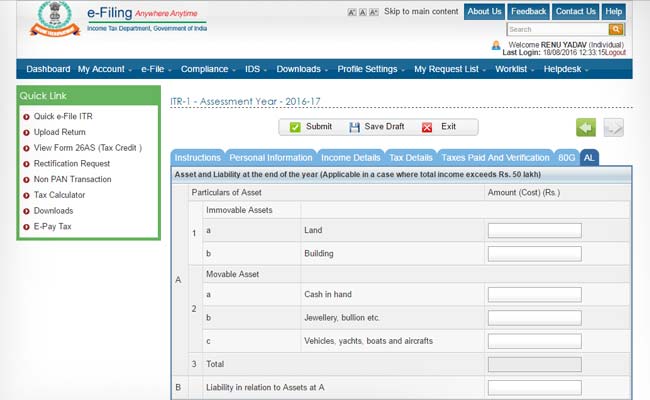
6) From this year, an additional column called "AL" has been added, in which you will have to disclose the value of your assets and liabilities at the end of the year, in case your income for the year is more than Rs 50 lakh.
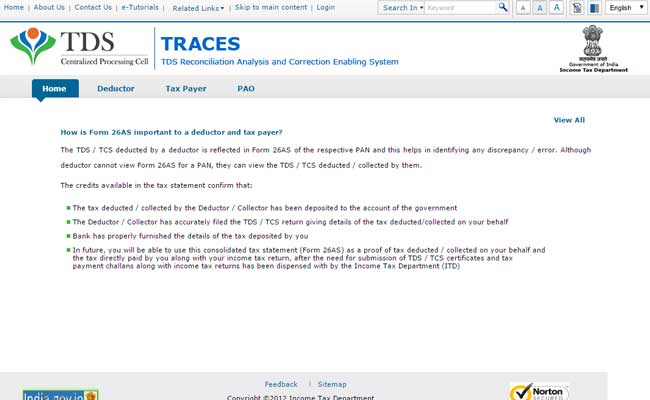
7) You can also download your Form 26AS, which is your consolidated tax statement summarizing tax paid against your PAN. You can validate your tax return with Form 26AS to check you tax liability.
8) On submitting the form, an acknowledgement number is generated in case the return is submitted using digital signature. If the return is submitted without a digital signature, an ITR-V is generated and is sent to your registered email ID. ITR-V is an acknowledgement that your return has been submitted.
9) You will have to send the signed ITR-V to the centralized processing centre in Bengaluru within 120 days of filing the return to complete the tax filing process.
10) You can also e-verify (don't have to send the ITR-V to Bengaluru office) your return through electronic verification by using the e-verify return option on the website. You can also use the net banking, Aadhaar-based one-time password to e-verify it.
Here is a 10-point guide:
1) To e-file your income tax return, you will have to register yourself on the Income Tax Department's website using your personal details. Your permanent account number (PAN) will be your user ID.

2) There are two ways of e-filing your income tax return. First, you can go to the download section and select the requisite form, save it on your desktop and fill all the details. Click on 'generate XML'. Then go to the website again and click on the 'upload XML' button. You will have to first log into to upload the XML file saved on your desktop and click on submit.

3) You can go to the quick e-file section of the website. Log in and select the form and the assessment year for which you are filing return and fill in all the details.


5) You will have to keep a few documents such as your PAN number, Form 16, your interest statement, tax deducted at source (TDS) details and investments proves handy while e-filing your income tax return.

6) From this year, an additional column called "AL" has been added, in which you will have to disclose the value of your assets and liabilities at the end of the year, in case your income for the year is more than Rs 50 lakh.
7) You can also download your Form 26AS, which is your consolidated tax statement summarizing tax paid against your PAN. You can validate your tax return with Form 26AS to check you tax liability.
8) On submitting the form, an acknowledgement number is generated in case the return is submitted using digital signature. If the return is submitted without a digital signature, an ITR-V is generated and is sent to your registered email ID. ITR-V is an acknowledgement that your return has been submitted.
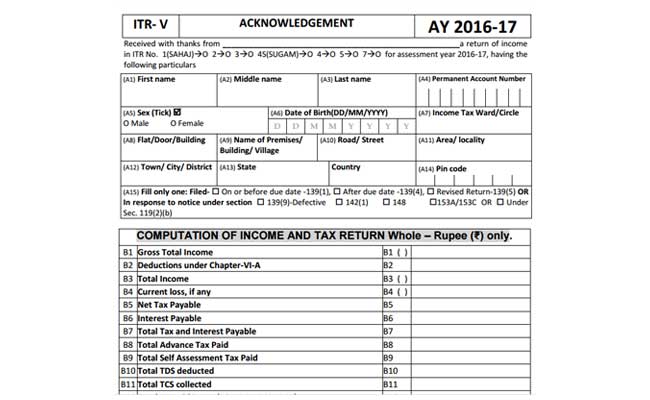
9) You will have to send the signed ITR-V to the centralized processing centre in Bengaluru within 120 days of filing the return to complete the tax filing process.
10) You can also e-verify (don't have to send the ITR-V to Bengaluru office) your return through electronic verification by using the e-verify return option on the website. You can also use the net banking, Aadhaar-based one-time password to e-verify it.

Essential Business Intelligence, Sharp Market Insights, Practical Personal Finance Advice, Daily Fuel, Gold and Silver Prices and Latest Stories — On NDTV Profit.