Pensioners can now submit their life certificates online through the Jeevan Pramaan portal or the UMANG app, without having to visit a bank or government office in person. The digital service allows eligible pensioners to generate a Digital Life Certificate using face authentication.
A life certificate confirms that a pensioner is alive and eligible to continue receiving pension payments. Banks and other pension-disbursing agencies require the document to process these payments.
Earlier, pensioners generally had to visit the concerned office to submit their certificates or obtain them through an authorised official. The process could be difficult for elderly people, those with mobility issues and pensioners who had moved to another city after retirement.
Also Read | Layoffs Are Rising In Tech, But These Skills Are Helping People Unlock Better Pay
Jeevan Pramaan has made the process easier by allowing pensioners to generate and submit their certificates digitally. The service is available to pensioners of the Central Government, state governments, Union Territories and other government organisations, including public sector employees and defence pensioners.
Also Read | Chips Will Matter In The Long Run, Even If Returns Take Time: Tata Sons' N Chandrasekaran
What is Jeevan Pramaan and how does it work?
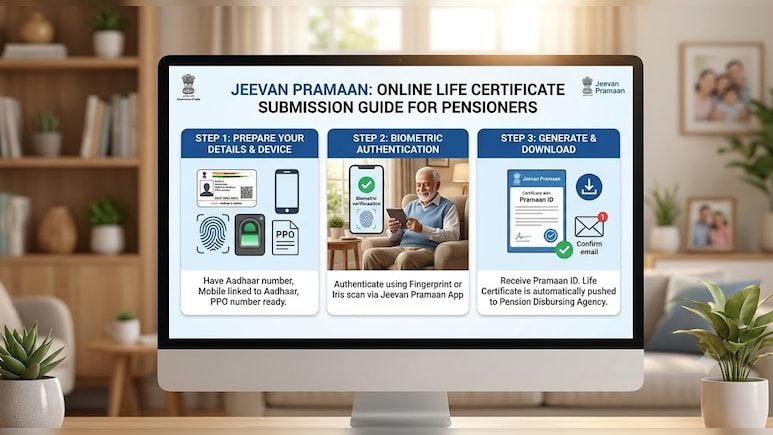
Jeevan Pramaan is a government service that allows pensioners to submit their life certificates online. It uses Aadhaar to verify their identity.
After successful verification, a Digital Life Certificate is generated. The system gives the certificate a unique Pramaan ID and stores it online. Pensioners can use this ID to access their certificate later. Banks and other pension-disbursing agencies can also access it online.
Pensioners can generate the certificate through the Jeevan Pramaan app or by visiting an authorised Jeevan Pramaan Centre. They can also use the UMANG app to complete the process through face authentication.
Also Read | FSSAI To Tighten Grip On $80 Billion Online Market
How to generate a Digital Life Certificate through the UMANG app
Download the UMANG app: Install and open the UMANG app on your smartphone.
Search for Jeevan Pramaan: Find the Jeevan Pramaan service and select the option to generate a Digital Life Certificate.
Choose face authentication: Select the face authentication option. If prompted, install the AadhaarFaceRD app.
Enter your details: Provide your Aadhaar number and the required pension-related information.
Complete face authentication: Follow the on-screen instructions to complete the authentication process.
Submit your application: Review the details and submit them to generate your Digital Life Certificate.
Save your Pramaan ID: Once the process is complete, you will receive a unique Pramaan ID. Keep it safe, as you may need it to access your certificate or check its status.
What to do if the certificate is rejected: Check the application status and contact your bank, post office or pension-disbursing authority if the certificate is rejected or its status remains unclear.
How to download your life certificate
After generating the certificate, visit the official Jeevan Pramaan website to download a PDF copy. You will need your Pramaan ID to access it.
Essential Business Intelligence, Sharp Market Insights, Practical Personal Finance Advice, Daily Fuel, Gold and Silver Prices and Latest Stories — On NDTV Profit.