
The Jharkhand Academic Council (JAC) is set to declare the JAC Class 10 & 12th results for 2026 on its official site, jacresults.com. The report suggests that the evaluation of answer sheets is almost complete, implying that the scorecards will be available soon.
JAC Class 10 & Class 12 results
The Jharkhand Academic Council (JAC) is likely to announce the Class 10 Result 2026 soon, as the evaluation and processing are currently in the final stage, according to an official notice. The clarification comes after the council debunked misleading reports, including fabricated images and screenshots circulating on social media regarding the result declaration.
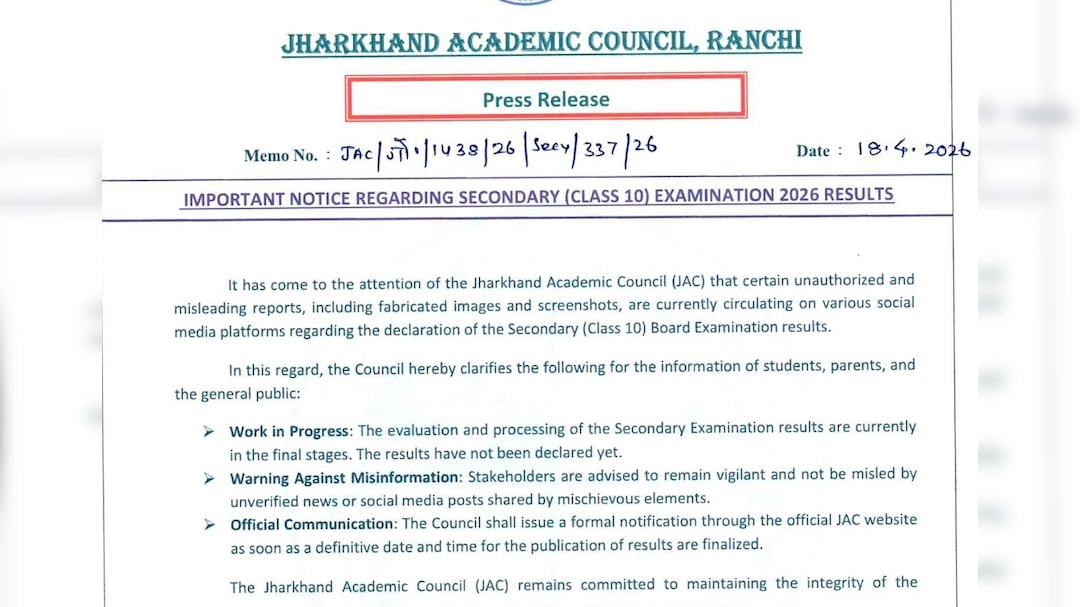
The anticipated announcement of the JAC 10th Result 2026 is projected to be announced in the third or fourth week of April 2026.
Also Read | Layoffs Are Rising In Tech, But These Skills Are Helping People Unlock Better Pay
Previous patterns suggest that the JAC Class 12 result for 2026 is likely to be declared either in the final week of April 2026 or in the early days of May 2026, should the grading process extend beyond it. Nevertheless, the precise date and time will be announced by the board soon.
ALSO READ: UPMSP To Announce UP Board Result 2026 Soon: Here's What Students Should Know
This year, the intermediate examinations took place from 3 February to 23 February across the streams of arts, science, and commerce. Class 10 examinations from 3 February to 17 February, 2026. Over 430,000 candidates participated in the class 10 examinations at 1,238 venues across Jharkhand.
Following the conclusion of the examinations, the answer copies were sent to specific evaluation centres, where the grading process is now at its concluding stage.
JAC Class 12 & 10 results 2026: Follow this guide to check & download results
Step 1: Head to the official portal of the Jharkhand Academic Council, jac.nic.in, jacresults.com, or jac.jharkhand.gov.in.
Step 2: On the main page, find and select the link titled “JAC Class 12 or Class 10 Result 2026".
Step 3: You will then be taken to the results login interface.
Step 4: Input your roll code and roll number as stated on your admit card without any alterations.
Step 5: Press the submit button to continue.
Step 6: Your score will be displayed on the screen.
Step 7: Save the temporary marksheet as a PDF.
Step 8: Print it out for future use until your school's official marksheet is released.
The digital scorecard will be temporary. Students will get the official mark sheets from their individual schools at a later date.
Essential Business Intelligence, Sharp Market Insights, Practical Personal Finance Advice, Daily Fuel, Gold and Silver Prices and Latest Stories — On NDTV Profit.