The Central Board of Secondary Education (CBSE) on Monday announced CBSE Class 12th results. Students who appeared for the CBSE Class 12 board exams can check and download their results from the official website at cbse.gov.in or cbseresults.nic.in.
CBSE Class 12 Results: How To Check?
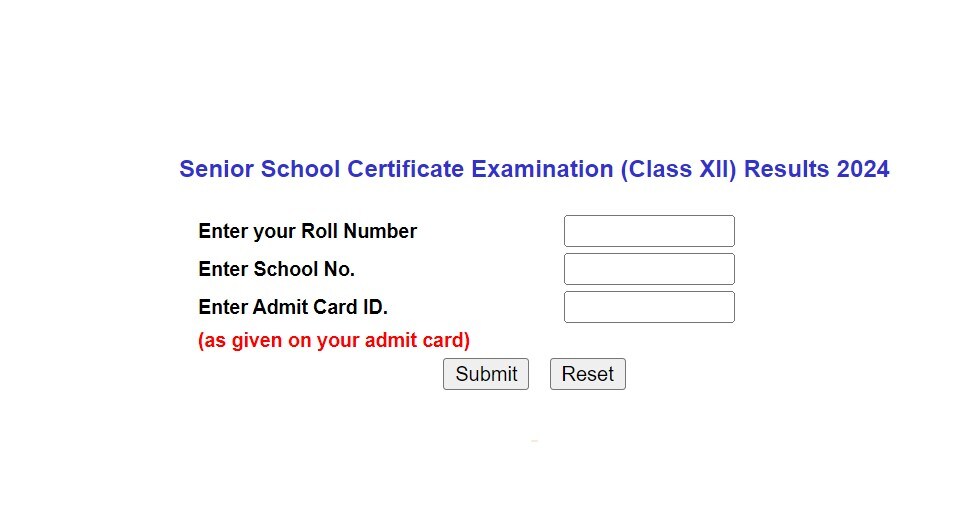
Here are steps to check CBSE Class 12th results:
Step 1: Go to the direct link - https://cbseresults.nic.in/
Step 2: Enter your Roll Number.
Step 3: Enter School No.
Step 4: Enter Admit Card ID (as given on your admit card).
Step 5: Click on Submit.
Your CBSE Class 12th result will appear on screen. Check and take a printout for further reference.
Students can also check their CBSE Class 12 Results on Digilocker Results Page. To check CBSE Board 12th results, students should click on: results.digilocker.gov.in, fill in their role number, class and school number.
Next, click on agree to terms of use and then submit. Your CBSE Class 12 Results will flash on the screen.
📢Good News! Congratulations to all #CBSE Class XII students. Your board results are now available on #DigiLocker Result page. Check your results now. All the best for your achievements! https://t.co/tatAelhw7U #classXII #cbseresult2024 pic.twitter.com/j8u7t25ROn
May 13, 2024CBSE Class 12 Results 2024: Girls Outshine Boys
Girls have again outshone boys in the CBSE Class 12 board exams, results for which were declared on Monday with 87.98 per cent of students passing the test.
Last year, the total pass percentage was 87.33 per cent. Officials said 91.52 per cent of girls cleared the exam, 6.40 percentage points higher than boys' pass percentage.
"A total of 24,068 students have scored above 95 per cent marks while 1,16,145 students have scored above 90 per cent," an official said.
More than 1.22 lakh candidates have been placed in 'compartment'. The number this year is slightly less than that of last year, the officials said. This time, more than 16.21 lakh candidates appeared for the exam which was conducted at 7,126 centres.
(with inputs from PTI)
Essential Business Intelligence, Continuous LIVE TV, Sharp Market Insights, Practical Personal Finance Advice and Latest Stories — On NDTV Profit.