How To View SBI Account Statement, Transaction History Online In 10 Steps
State Bank of India (SBI), the largest lender of the country, offers a host of online services. You can check your account statements and transaction history online via onlinesbi.com, the bank's internet banking portal. All that you need is a browser in a computer system or smartphone. Customers can view the statements of all accounts, including public provident fund (PPF) accounts that they hold with SBI, according to the lender. SBI account statements can be downloaded in excel or PDF formats, it noted.
Given below are 10 steps that will help you check SBI account statement and transaction history online:
1. Open onlinesbi.com in any browser. Click login within 'personal banking' and click on 'Continue to Login'.
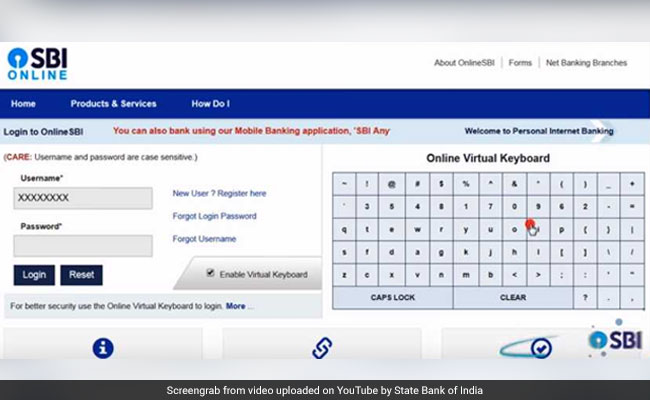
2. On the next page, type your username and your login password. For security reasons, it is better to use a virtual keyboard, according to SBI. You can enable it by clicking on 'enable virtual keyboard'. Now click on the alphabets, numbers and special characters that form your password via the virtual keyboard. Click on login after inputting the complete password.
3. After this, you are logged into your account. By default, 'my account & profile' tab gets opened. You can see transaction accounts and deposit accounts in its 'Account Summary' option. Click on 'Click Here to See Balance' to check balance in any account.
(Also Read: State Bank Of India Makes Changes To Select Services, Details Here)
4. If you want to see the last 10 transactions of any account, click on 'Click Here for Last 10 Transactions'.
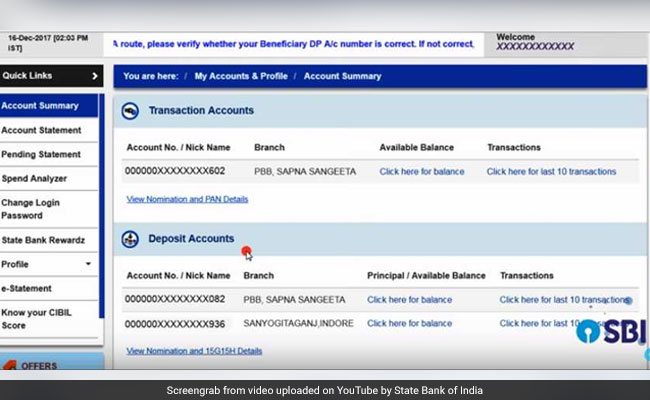
(You can see transaction accounts and deposit accounts in 'Account Summary' option.)
5. Click on 'Account Statement' towards the left side to see your account statement. Select the account, the statement of which you want to see, said SBI. If you have only one account, it will be selected by default. If you want to generate an account statement for a specific time period, then select the 'By Date' option. Click on the calendar sign and select the start date and end date for which you want to see the statement. At one go, a statement of six months can be seen.
(Also Read: Need To Make An Online Money Transfer? SBI Charges, Transaction Limits Compared)
6. 'View' option is selected by default. Here you can select the number of transactions you want to see on one page. Click on 'Go'. Then, you can see the account statement for the period you selected. Click on 'Print' if you want to take a print out of the transaction.
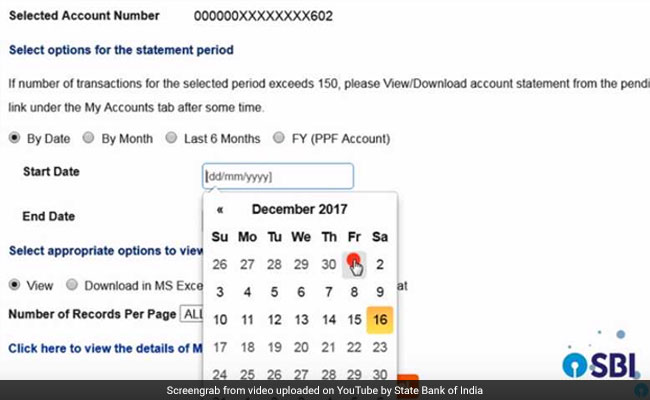
7. Click on 'View Another Statement'. If you want statement of any particular month, then select 'By Month'. After this, select the year and month and click on 'Go'. You can then see the statement of the year and month you selected.
(Also Read: Do You Use SBI Internet Banking Service? Why You Need To Register Your Mobile)
8. If you want to see statement of last six months, click on 'View Another Statement' and then on 'Last 6 months'.
9. If you want to see statement of any financial year of your PPF account, then select 'FY (PPF Account)'. Select the year and click on 'Go'.
10. You can download the statement in Excel and PDF format. For this, first select period, then the format and click on 'Go'. The statement will then be downloaded.

-
Unhedged Position: Can India See An Indonesia-Style Time Correction?

The Nifty is trading below levels it first clocked in 2024. Is there, then, as I have suggested in the headline, potential that the current time correction drags on painfully for the next three-five, even ten years?
-
Navigating Friction And Energy Realities: An Analysis Of Marco Rubio's October Visit To India
Occurring at a critical juncture marked by stalled trade negotiations and escalating geopolitical pressures over global energy supplies, the visit offers a profound window into modern US-India relations.
-
India Exports Capital. Why Not Export Trusteeship?
The big question, then, is whether India can build an institution that global borrowers, investors, banks, and lawyers can trust, even without an Indian connection.
-
France's Economy & Politics Are In Crisis | The Reason Why
Let's look at how the French economy and politics evolved under Nicolas Sarkozy, Franois Hollande and Emmanuel Macron.
-
You May Inherit The Business. You Must Earn Its Credibility.
Succession tests the founder's ability to share authority as much as it tests the next generation's readiness to assume it.
-
Signing Deals Is One Thing; Making Them Work Is Another | The Week In Whys
Sometimes, things don't turn out as planned. Indian companies have lost some bids to rivals, some projects won't produce until 2030.
-
FOMC Wall, PERM Suspension, Hospital Stocks | Talking Points This Week
A PERM suspension would directly affect green-card sponsorship rather than H-1B visas, so the near-term earnings impact could remain relatively limited. The key question is whether this marks a new phase in US scrutiny of Indian IT.
-
Everything, Everywhere, All At Once: Dalal Street's Week To Forget | Joining The Dots
Visa curbs, a Starlink spat and cancer drug caps: what connects this week's shocks for Indian markets
-
India Is Going Abroad For Critical Minerals. But It May Take Years To Pay Off | The Reason Why
Although India's steps are in the right direction, they remain modest compared with India's growing dependence.
-
When Everyone Has AI, What Gives You An Edge?
India's young workforce is entering an uncertain world of work where powerful AI tools are becoming widely accessible. The advantage will belong to those who combine deep expertise with digital fluency, and the distinctly human capabilities that technology cannot manufacture.