SBI Internet Banking: How To Open Account, Reset Login Details
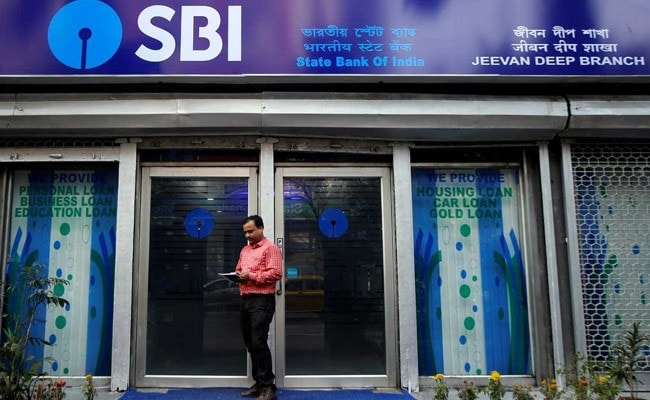
SBI or State Bank of India offers a host of facilities via its internet banking portal - onlinesbi.com. Some of these facilities enable SBI customers to access information on account balance, request a fund transfer or a demand draft, open a digital savings bank account and apply for a new cheque book. SBI customers with subscription to the bank's internet banking facility can carry out these banking tasks, among others, from their desktop or mobile devices, without having to physically visiting a bank branch, according to SBI's internet banking website. Besides, among other facilities, the country's largest lender also allows its internet banking subscribers to set up a recurring deposit or PPF (Public Provident Fund) account. (Also read: How To Register For India Post Internet Banking Facility)
Here's how an SBI internet banking subscriber can access some of these facilities through the bank's OnlineSBI portal (onlineSBI.com):
In order to be able to make use of these facilities on OnlineSBI, users are required to have an account with the bank and also an active subscription to its internet banking service. For registration, users can download the registration forms from the OnlineSBI website, complete the form and submit it at SBI branch. Registration formalities complete after details are verified and authenticated by the branch, said SBI on its website - onlinesbi.com.
Upon registration, the SBI bank branch provides the subscriber with a "Pre Printed Kit (PPF)", which contains details such as a username and a password. These details are required for logging into the portal for the first time after registration. Users can then log in to onlinesbi.com using this username and password. At the first login, he/she will need to go through a simple initialization process, according to SBI.
(Also read: How To Enable, Disable State Bank Of India SMS Alerts Via Internet Banking)
How to change SBI internet banking username and password
After receiving the internet banking username and password, for accessing SBI's internet banking (OnlineSBI) facilities, the user is required to mandatorily change the user name and password during the first session, according to the SBI website. While the password can be changed later, but not the username, according to SBI.
(Also read: How To Activate State Bank Of India ATM Card Online Through Internet Banking)
How to reset SBI internet banking username and password
In case user forgets his/her login username or password, he/she can reset it.
Here are the steps to resetting the SBI internet banking username:
Step 1: Go to the login screen of SBI's online banking page-onlinesbi.com and click on "forget username" tab

Step 2: User will be redirected to another page. To generate the username, the user is required to enter the "CIF number". One can find the CIF number in the bank's passbook or in the account statement.

Step 3: In the second field, enter the country of residence.
Step 4: In the third field, enter the registered mobile number and type in the captcha shown on the screen and press "confirm". Username will be displayed on the screen and will also be sent to the registered mobile number
Here are the steps to reset SBI internet banking password:
Step 1: Click on "Forget Login Password" on the login screen
Step 2: User will be redirected to another screen where he/she is required to enter the details like username, account number, country, mobile number, date of birth followed by the captcha shown on the screen
Step 3: Now click on 'Submit'
Sep 4: User will receive an OTP on the registered mobile number. Enter that and press submit
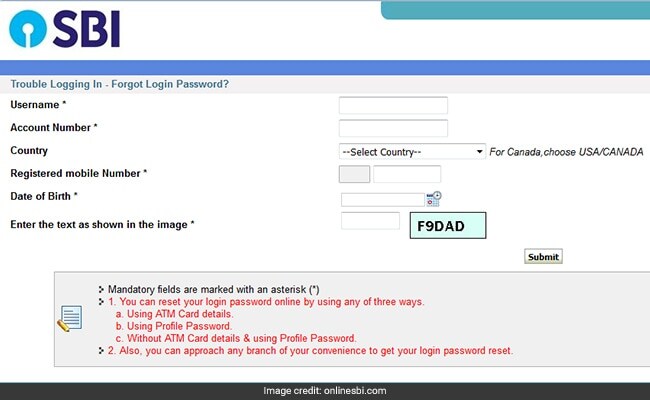
Users can also create login password using ATM card details. In that case, user will be required to enter details like the ATM card number, validity date, card holder name and ATM PIN and the captcha shown on the screen. Bank will then ask user to enter a new login password and then confirm the new login password. After this, the login password will be reset.
-
Ten Things I Learnt This Samvat

Patience can be a trap. Cheap stocks can stay cheap. Leverage can wipe you out. What did Samvat 2082 teach us? Niraj Shah writes on 10 lessons from the year gone by.
-
Talking Points This Week: Tech Nerves, FII Buying, And A Faraway Banking Shock
The global markets are not shining this Diwali. The exception in the large markets is, India.
-
Midterm Rally Lasted A Day. The Hard Reality Of A Divided US May Last Two Years | Opinion
Between a contested AI boom, a debt ceiling that arrives in 2027 and a president with every incentive to act alone, the next two years may prove more volatile than the first day's rally suggests.
-
Blue Wave Will Derail the AI Trade but Won't Dismantle the AI Era | Unhedged Position
The Democrats' sweep of the US Congress will see politics collide with economic forces both over the long and short term.
-
It's Time To Take The GST Council's Bet On Trust Global
Payment records can prove India's services exports, and clear, proportionate rules can bring foreign digital sellers into the tax net.
-
Opinion | India at 38: From Innovation Overperformer to Innovation Powerhouse
India now has 453 VC-backed deep science startups, 18 of them late-stage, after 117 percent growth since 2020. Laurus Labs, at USD 9.3 billion, is the most valuable deep science company in any middle-income economy outside China.
-
Navigating Energy Crossroads: S Jaishankar's Call For Diversified Supply Chains At G20 Ministerial Meeting
As geopolitical fault lines continue to test maritime trade routes and commodity flows, Jaishankar's message remains pertinent: true economic resilience requires open markets, protected transit lines, and a genuine commitment to multilateral cooperation rather than coercion.
-
Indians Are Travelling, But Not Every Journey Is A Holiday | The Week In Whys
Pilgrims, patients and working women are the real travellers, and the system hasn't quite caught up with them.
-
Getting To Work Costs Women More | The Reason Why
It is not just about women paying more than men. It is about women paying much more in cities than in villages.