How You Can Get A Digital Copy Of Your Aadhaar Card
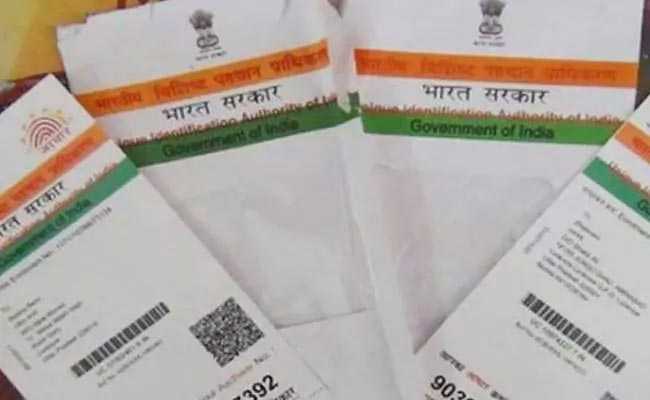
The Unique Identification Authority of India (UIDAI) — which manages the government's Aadhaar biometric ID programme — lets Aadhaar-registered users to download a digital copy of their identification card. This online facility is available on the UIDAI website as well as mobile app mAadhaar. The Unique Identification Authority of India is the issuer of the 12-digit personal identification Unique Identity Number, also known as Aadhaar number. (Also Read: How To Order An Aadhaar Card Reprint)
Here is the step-by-step guide to download a digital copy of an Aadhaar card:
The user selects the "download Aadhaar" option under the "Get Aadhaar" section on the the Aadhaar website (uidai.gov.in).
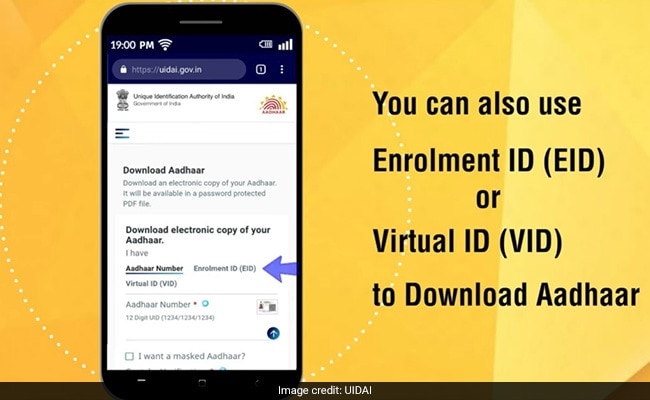
Next, the user selects any of the three options to proceed:
- Aadhaar number (UID)
- Enrolment ID (EID)
- Virtual ID (VID)
At this stage, the user can also select whether a masked copy is desired. On a masked version, the entire UID is not visible.
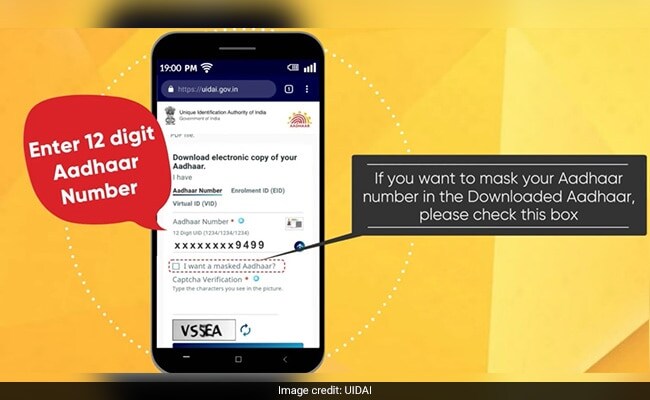
The user clicks on the "Send OTP" button after filling in the necessary details, and enters the OTP or one-time passcode (received on the Aadhaar-registered mobile) in the given space to proceed.
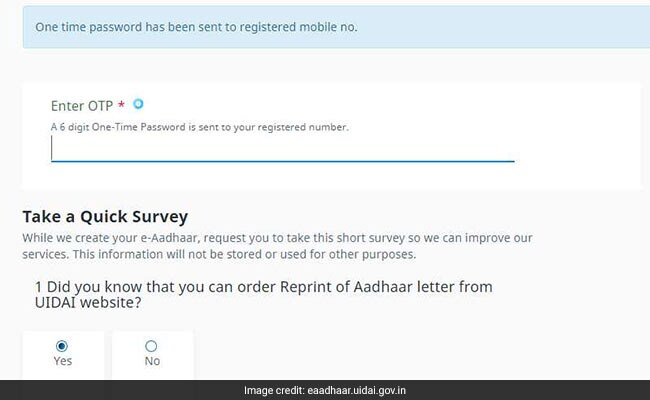
After this, the user selects the "verify and download" option to proceed.
https://t.co/yyq9dgmvEB to know how you can download your latest updated Aadhaar anytime anywhere. This downloaded Aadhaar is as valid as the Aadhaar letter received by post (Related circular: https://t.co/8vlJO3yt7f) pic.twitter.com/hwi1MdVutv
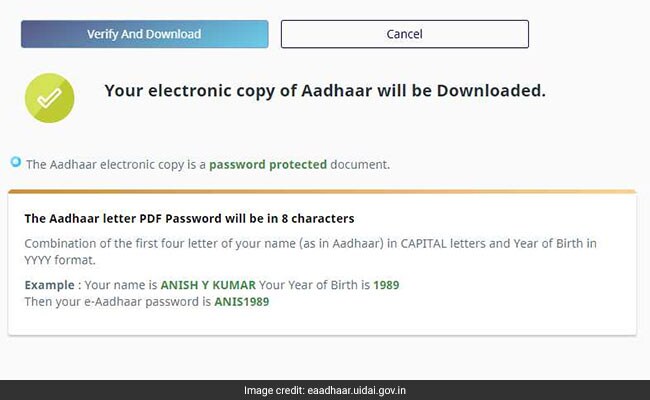
July 23, 2020Upon successful completion of the process, a digital copy of the Aadhaar card is downloaded on the device being used. The downloaded file is in the PDF format, and is protected by a password (the user is required to enter a password to be able to access it).
This password is a combination of the first four letters of the user's name in capital letters, followed by the user's birth year in the YYYY format, according to the UIDAI website.
A similar process can be used to download an Aadhaar card using the mAadhaar app.
-
High US Salaries, No Green Card Certainty: The Financial Calculation Facing Indian H-1B Families

The suspension of PERM processing at eight technology employers does not cancel existing H-1B visas. What it does is force a question many Indian families have been avoiding: is the US salary worth tying your career and family plans to one employer?
-
Swiggy vs Eternal: Food Delivery's Two Rivals Are No Longer In The Same Race
Eternal is building a private AI assistant, dark.ai. Swiggy is still working out how to make Instamart pay, with an operating loss of Rs 895 crore in the July-September quarter while Blinkit stayed profitable.
-
Where You Live Shapes How You Get To Work | The Reason Why
Two-wheelers are the most popular way to get to work in India, accounting for nearly 43% of workplace commutes.
-
Unhedged Position: Can India See An Indonesia-Style Time Correction?
The Nifty is trading below levels it first clocked in 2024. Is there, then, as I have suggested in the headline, potential that the current time correction drags on painfully for the next three-five, even ten years?
-
Navigating Friction And Energy Realities: An Analysis Of Marco Rubio's October Visit To India
Occurring at a critical juncture marked by stalled trade negotiations and escalating geopolitical pressures over global energy supplies, the visit offers a profound window into modern US-India relations.
-
India Exports Capital. Why Not Export Trusteeship?
The big question, then, is whether India can build an institution that global borrowers, investors, banks, and lawyers can trust, even without an Indian connection.
-
France's Economy & Politics Are In Crisis | The Reason Why
Let's look at how the French economy and politics evolved under Nicolas Sarkozy, Franois Hollande and Emmanuel Macron.
-
You May Inherit The Business. You Must Earn Its Credibility.
Succession tests the founder's ability to share authority as much as it tests the next generation's readiness to assume it.
-
Signing Deals Is One Thing; Making Them Work Is Another | The Week In Whys
Sometimes, things don't turn out as planned. Indian companies have lost some bids to rivals, some projects won't produce until 2030.
-
FOMC Wall, PERM Suspension, Hospital Stocks | Talking Points This Week
A PERM suspension would directly affect green-card sponsorship rather than H-1B visas, so the near-term earnings impact could remain relatively limited. The key question is whether this marks a new phase in US scrutiny of Indian IT.