How To Activate New State Bank Of India ATM Card, Register For Net Banking Online
State Bank of India (SBI) provides a variety of services online through its internet banking portal, onlinesbi.com. From activating a newly-received ATM card from the bank to online registration using the ATM card, State Bank of India (SBI)'s internet banking subscribers can make use of a number of tools available online through the internet banking portal. In order to activate a new ATM card online, the SBI internet banking subscriber - the SBI customer who has opted for the bank's internet banking facility - need not visit an ATM or bank branch.
In other words, SBI's internet banking (or net banking) portal allows the customer to perform several such tasks related to its ATM card online. SBI has stated few steps for eligible customers to make use of the OnlineSBI portal to perform many such tasks, according to video tutorials shared by the country's largest bank on its website.
How to register online for SBI internet banking facility using ATM card
SBI, through its internet banking portal, allows its customers to register for its net banking service without having to visit a bank branch. On the onlineSBI.com portal, the customer can select "new user registration" under the personal banking section.
This option leads to a link which is meant for customers who have not received a "pre-printed kit" from the bank. The option is not applicable to SBI customers who have already obtained the pre-printed kit from a branch of the bank for activating the internet banking facility.
After this, eligible customers - those who have not received the pre-printed kit from the bank - are required to fill in details such as account number, CIF (Customer Information File) number, branch code and the registered mobile number. Details including account number, CIF number and branch code can be found on the passbook or account statement, SBI explains.
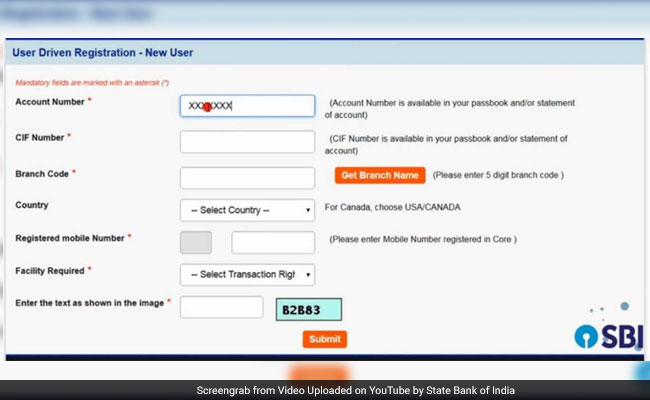
Once all the required details are entered, the user may proceed by clicking on "submit".
After this step, the bank sends a one-time password (OTP) to the customer on his or her registered mobile number.
This OTP is to be entered in the given space. The user can proceed by clicking on "confirm" after entering the OTP.
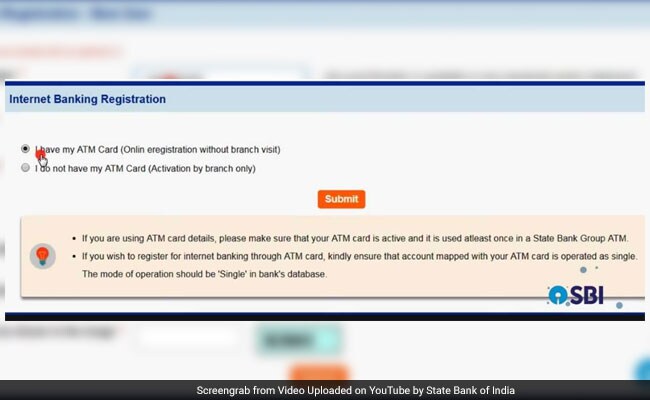
The portal gives two options:
- "I have my ATM card (online registration without branch visit)"
- "I do not have my ATM card (activation by branch only)"
The user is required to select the applicable option. With the first option, the user is asked to provide details such as card number, card holder's name and card expiry date. After filling in the necessary details, the user can click on "proceed" to go to the next step.
A temporary username is created for the user for using internet banking, and displayed on the page.
The customer is then asked to enter a password of his or her choice. After this, the user can proceed by clicking on "submit".
The OnlineSBI portal confirms the completion of registration for internet banking.
The customer can use this temporary username - which is sent to him/ her on the registered mobile number - and the password created by him or her to log in to the internet banking portal for the first time.
Once logged in to the internet banking portal (OnlineSBI.com) for the first time, the user can create a new username, and login and profile passwords, according to SBI.
How to activate new State Bank of India ATM card online through net banking portal (onlineSBI.com)
After logging in to the OnlineSBI portal, the customer is required to access the "ATM Card Services" option under the "e-Services" section, according to the bank.
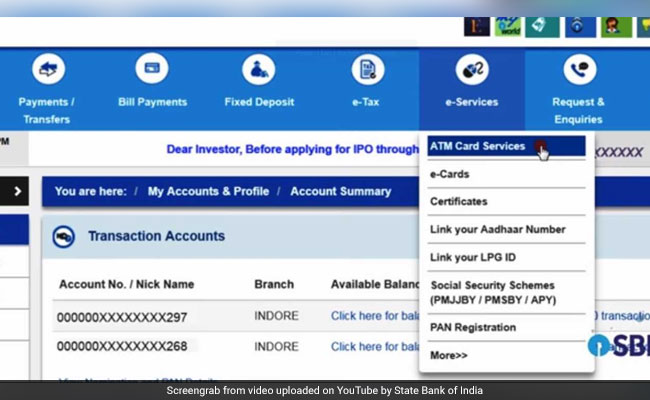
Clicking on the "ATM Card Services" link takes the customer to the said section, which has multiple options. The customer can proceed by clicking on the "New ATM Card Activation" option.
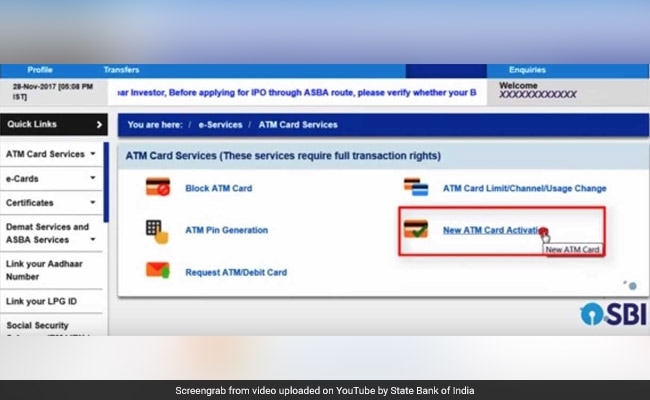
The user is required to select the account from which the ATM card is issued. If the customer has only one account with the bank, the same would be pre-selected, SBI explained in its tutorial published on video-sharing website YouTube.
After this step, the user may proceed by entering the 16-digit ATM card number twice in the given fields, and click on "Activate".
The customer is required to verify the details - such as account type and branch location - displayed on the screen by the internet banking portal, and confirm by clicking on "Confirm".
The bank sends a security password, called "high security password", on the customer's registered mobile number. This security password is required to be submitted by the user in the given field. After entering the same, the customer may proceed by clicking on "Confirm".
Upon entry of the correct password, SBI internet banking facility confirms the same by displaying the message: "ATM card has been activated successfully."
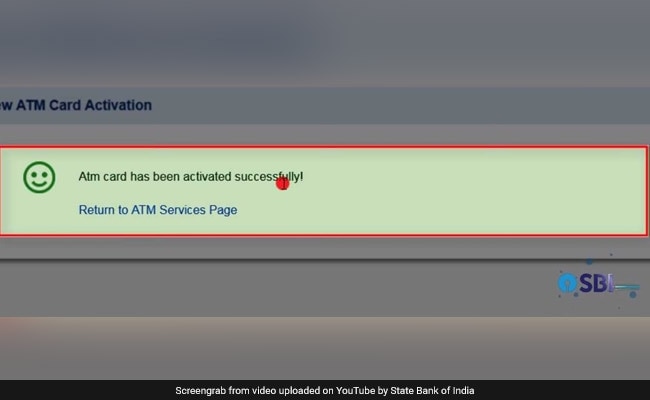
A newly-received ATM card can be used only after activation, according to SBI. The ATM card holder is required to generate a PIN to start transacting with the card. The user is then required to generate a PIN for the ATM card. This can be done through an online service, an SMS service, an IVR or interactive voice response service, or by visiting a bank branch, according to SBI.

-
AI Bias In Investing Cannot Be Eliminated, But It Can Be Governed

Framing is a particularly important example as identical financial information presented in terms of gains rather than losses can lead an LLM to reach a different assessment.
-
Joining The Dots | Dark Skies, Steady Diya: Why Hope Holds This Diwali
With war, a weak rupee and foreign outflows weighing on sentiment, policymakers at the NDTV World Summit and market veterans at NDTV Profit Ignite: Diwali Edition offered the same advice: stay invested and filter out the noise.
-
The Curious Case of Equitas Small Finance Bank And A CEO Who Quit For Stock
PN Vasudevan believes persistent investor concerns over a perceived conflict of interest had become a governance overhang on Equitas Small Finance Bank's stock, even as the lender improved profitability and asset quality.
-
Talking Points This Week: AI Cash Burn, A Tiger Comeback And An India That Still Finds Its Own Path
India is not immune to higher oil or tighter global liquidity, yet its earnings base is broader, its domestic policy levers are still available.
-
Foreign Investors Own Half Of HDFC Bank and ICICI Bank. An LTCG Cut Could Matter Most Here
Foreign portfolio investors have US$115 billion parked in HDFC Bank, ICICI Bank. If the government cuts long-term capital gains tax, Jefferies says returning foreign money could land here first.
-
'Never Seen This Level Of Negativity': Sandeep Tandon Says The Next Rally May Be Closer Than You Think
Veteran investor Sandeep Tandon says foreign selling is easing, large-caps are due a comeback and mid-caps are crowded, while he turns positive on gold, power and pharma this Diwali.
-
Indians Stay With Family, Not In Hotels | The Reason Why
India still lacks enough clean, reliable and affordable hotels for budget-conscious travellers.
-
The Economic Imperative: Analysing The Material Driving Force Behind India-Canada Strategic Reset
This economic complementarity is further reinforced by deep institutional investment ties and talent mobility, which form the bedrock of the bilateral framework.
-
Medicine Pricing: Where Must Profit Stop?
India must confront excessive margins, hidden incentives and regulatory gaps that threaten the integrity of medicine.
-
Why Amazon And Flipkart Are Struggling To Beat Meesho In India's Smaller Cities
With 274 million users and lowest-cost logistics, Meesho is defending its value commerce crown against giants like Amazon and Flipkart.